

Why SAP S/4HANA Migration is a Strategic Moment? Best
Transitioning to SAP S/4HANA is not only a matter of technology; fundamentally, a company can change the way it handles operations, sales, and growth with data by it. Why SAP S/4HANA Migration is a Strategic Moment Cockpit is the instrument that makes the impact whereas other instruments like LTMOM, Data Migration Status App, staging tables, or SAP Data Services are supporting it. Our pedagogical approach at GTR Academy makes the use of these instruments a skill set, so the professionals can manage the migrations in a result-oriented manner.
Connect With Us: WhatsApp
Challenge
Common pitfalls that slow down migrations:
Modeling and customization require precision
The Migration Object Modeler LTMOM is the place where migration objects are not only shaped but also adapted. It is frequently the case that by adding fields, producing custom migration objects, and determining selection criteria, one is at the same time doing mapping and transport work which if done wrongly will become fatal. GTR Academy’s practical LTMOM modules provide hands-on instruction on modeling, debugging, and transporting migration definitions.
Visibility and auditability are essential
The Data Migration Status App offers up-to-the-minute numbers of the migrated, simulated, and failed instances and is also able to present the links between Source IDs and Target IDs. Establishing roles correctly and setting up audit workflows are the things that keep traceability from having any gaps. Our labs demonstrate the use of the app for monitoring, extended statistics, and mass auditing.
Error handling must be systematic
Error handling has to be organized: Monitoring screens, history tabs, and correction files (XML/CSV) are the means through which the teams can identify, rectify, and reprocess the failed instances. Becoming proficient in both the production and modification of correction files will greatly lessen the amount of work that has to be redone and ensure that the projects will keep their timelines.
Templates and migration content need governance
Migration objects and migration templates (if XML is used) are the means through which business logic and API usage become encoded. In order to be able to avoid any unexpected events resulting from template modification between releases, one should always adhere to migration object documentation and do release comparisons.
Extensibility must be synchronized
When a business user is adding fields through the Custom Fields app, it is necessary for the migration templates to be updated. The Migration Cockpit’s Check for Custom Fields step is the one that guarantees that templates are in agreement with system extensions.
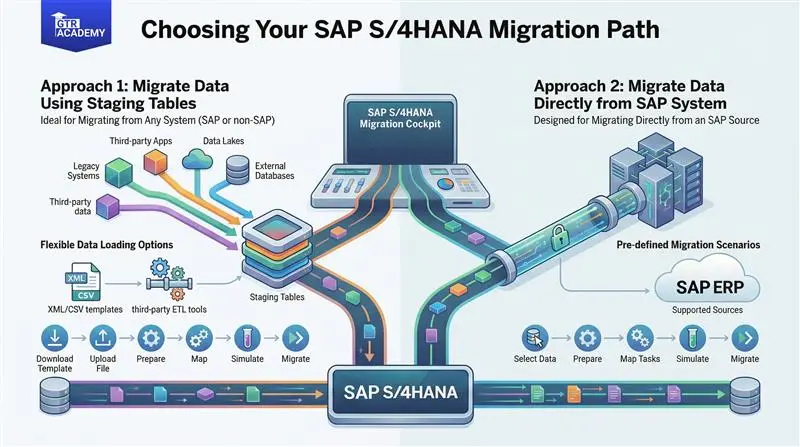
Choose the right data flow approach
Local or remote HANA schema staging tables can be used together with ETL tools such as SAP Data Services or SDI for bulk loads. Direct Transfer by means of RFC and the DMIS add-on is, without doubt, the best way to take ABAP sources but, at the same time, it requires that source preparation and selection criteria be done with utmost care.
Performance and data quality determine success
Cleaning data, sizing batches, tuning system parameters, and discovering bottlenecks (DB, UPDATE processes) are all examples of practical levers that can bring about a timely and cost-effective execution of the migration.
Conclude
Transform the intricacy of migrations into a source of competitive strength:
The toolkit for contemporary migrations comprises of the SAP S/4HANA Migration Cockpit, LTMOM, Data Migration Status App, staging tables, direct transfer, migration objects, migration templates, correction files, SAP Data Services, and ETL. Turning proficiency in these instruments and associated processes into a strategic momentum is what migration risk is converted into.
- GTR Academy has the lab facility which helps staff to experience staging and direct transfer scenarios practically.
- Detailed analysis on LTMOM modeling, mapping strategies, and transport governance.
- Audit and monitoring workshops which make use of the Data Migration Status App and correction file workflows.
- Performance clinics which are focused on batch design, system tuning, and bottleneck resolution.
Next step
Take an advanced course in SAP S/4HANA migration at GTR Academy to acquire the on-the-job training and the self-reliance necessary to carry out the fast, auditable, and future-ready migrations.

I am a skilled content writer with 5 years of experience creating compelling, audience-focused content across digital platforms. My work blends creativity with strategic communication, helping brands build their voice and connect meaningfully with their readers. I specialize in writing SEO-friendly blogs, website copy, social media content, and long-form articles that are clear, engaging, and optimized for results.
Over the years, I’ve collaborated with diverse industries including technology, lifestyle, finance, education, and e-commerce adapting my writing style to meet each brand’s unique tone and goals. With strong research abilities, attention to detail, and a passion for storytelling, I consistently deliver high-quality content that informs, inspires, and drives engagement.