


⚡Joule End-to-End Setup Guide: Activating SAP’s AI Copilot on BTP Best for 2025
SAP’s Joule AI copilot is changing the way companies interact with their SAP applications. By embedding AI-driven insights and automation across SAP SuccessFactors, SAP S/4HANA Cloud, and other Lobs, Joule enables enterprises to optimize operations, make better decisions, and provide a consistent user experience, End-to-End Setup Guide.
Setting up Joule on the SAP Business Technology Platform (BTP) is covered in this blog, which also points out prerequisites, step-by-step activation, and best practices.
Connect With Us: WhatsApp
🔑 Prerequisites
Make sure the following points before starting up:
- Eligibility: The organization is entitled to use the solution commercially and the user has the role of SAP BTP Global Administrator.
- Account Info: Be sure to have your SAP BTP Global Account ID available for system registration.
- Entitlements: The Joule services and SAP Build Work Zone (foundation plan) have been assigned.
- SAP Cloud Identity Services: Configured correctly and accessible to the relevant SAP systems.
🛠️ Step-by-Step Setup
- Planning & Activation
- Joule activation is done by your SAP Account Executive after you contact him/her.
- Centralize services by using a common SAP BTP Global Account.
- Check Entitlements
- Go to Entitlements → Service Assignments in SAP BTP.
- Make sure that both Joule and SAP Build Work Zone are there.
- System Registration
- Visit System Landscape → Systems in SAP BTP.
- Systems that are automatically detected (S/4HANA Cloud, SuccessFactors) should be there; if you cannot find them, do the registration manually.
- For each system, create the integration tokens and then use them.
- Subaccount Datacenter Planning
- Get your subaccounts ready for production and non-production purposes.
- Pick the closest data center region to lower the delay.
- Create & Configure Subaccount
- In Account Explorer, start a new subaccount.
- Turn on Cloud Foundry and create a Space there for the Joule setup.
- Trust Configurations
- With SAP Cloud Identity Services, you are now establishing trust.
- Makes sure the relevant SAP application URLs are trusted domains.
- Assign Entitlements & Activate Work Zone
- Permit the SAP Build Work Zone (foundation plan) to the entitlements.
- Turn on both instance foundation and subscription foundation plans.
- Assign Roles
- Users who manage Joule and Work Zone and have the Launchpad_Admin role will be able to perform more actions.
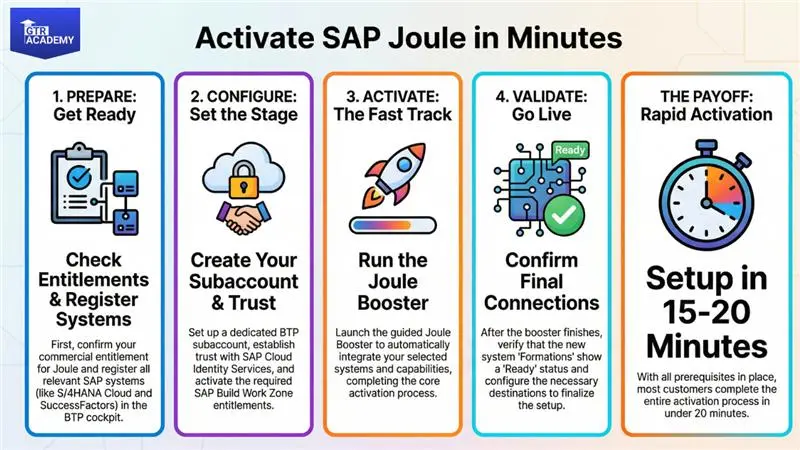
- Run the Joule Booster
- In SAP BTP, start the Joule booster.
- Choose subaccount, systems, and integration type (test vs. production).
- The booster checks the configurations and completes the activation in a matter of minutes.
- Post-Activation Tasks
- Check Formations in System Landscape.
- Use Service Keys to configure Destinations.
- Make sure that the Joule and Work Zone services are running.
🌟 Best Practices
| Step | Best Practice |
| Account Planning | Centralize services in a shared/global account |
| Entitlement Management | Double-check before setup |
| Trust & Security | Synchronize trusted domains consistently |
| Booster Execution | Complete prerequisites for smooth activation |
| Post-Go-Live | Validate readiness and maintain regular administration |
🚀 Benefits of Unified Setup
- Streamlined Integration: A single setup for multiple SAP solutions.
- Rapid Activation: If all prerequisites are met, the setup can be done in 15–20 minutes.
- Centralized Identity Management: Makes access and security simple.
- Scalable Architecture: Integration can be extended to new LoBs without any problem.
🧩 Troubleshooting Tips
- Systems Missing: Verify your entitlements and contract status.
- SuccessFactors Problem: Turn on Extension Center through Provisioning/Upgrade Center.
- Token Issues: Open a ticket under component BC-NEO-EXT-SF mentioning the system and datacenter along with it.
Connect With Us: WhatsApp
🎯 Final Thoughts
The Joule End-to-End Setup Guide is a quick response tool for activating SAP AI copilot across those landscapes that are complex, scattered or both. Companies like GTR Academy who efficiently clear the path through complicated SAP setups such as Joule, are the bridge that connect learners and professionals with real-world knowledge in SAP BTP, SuccessFactors, and S/4HANA Cloud.

I am a skilled content writer with 5 years of experience creating compelling, audience-focused content across digital platforms. My work blends creativity with strategic communication, helping brands build their voice and connect meaningfully with their readers. I specialize in writing SEO-friendly blogs, website copy, social media content, and long-form articles that are clear, engaging, and optimized for results.
Over the years, I’ve collaborated with diverse industries including technology, lifestyle, finance, education, and e-commerce adapting my writing style to meet each brand’s unique tone and goals. With strong research abilities, attention to detail, and a passion for storytelling, I consistently deliver high-quality content that informs, inspires, and drives engagement.