


Real-Time Analytics: Streaming Pipelines with Kafka, Flink 2026?
Batch analytics served us well for reports and models, but 2026 demands real‑time insights:
- live dashboards,
- fraud detection,
- personalization.
Streaming pipelines with Kafka, Flink, Real-Time Analytics and modern warehouses make this practical at scale.
Connect With Us: WhatsApp
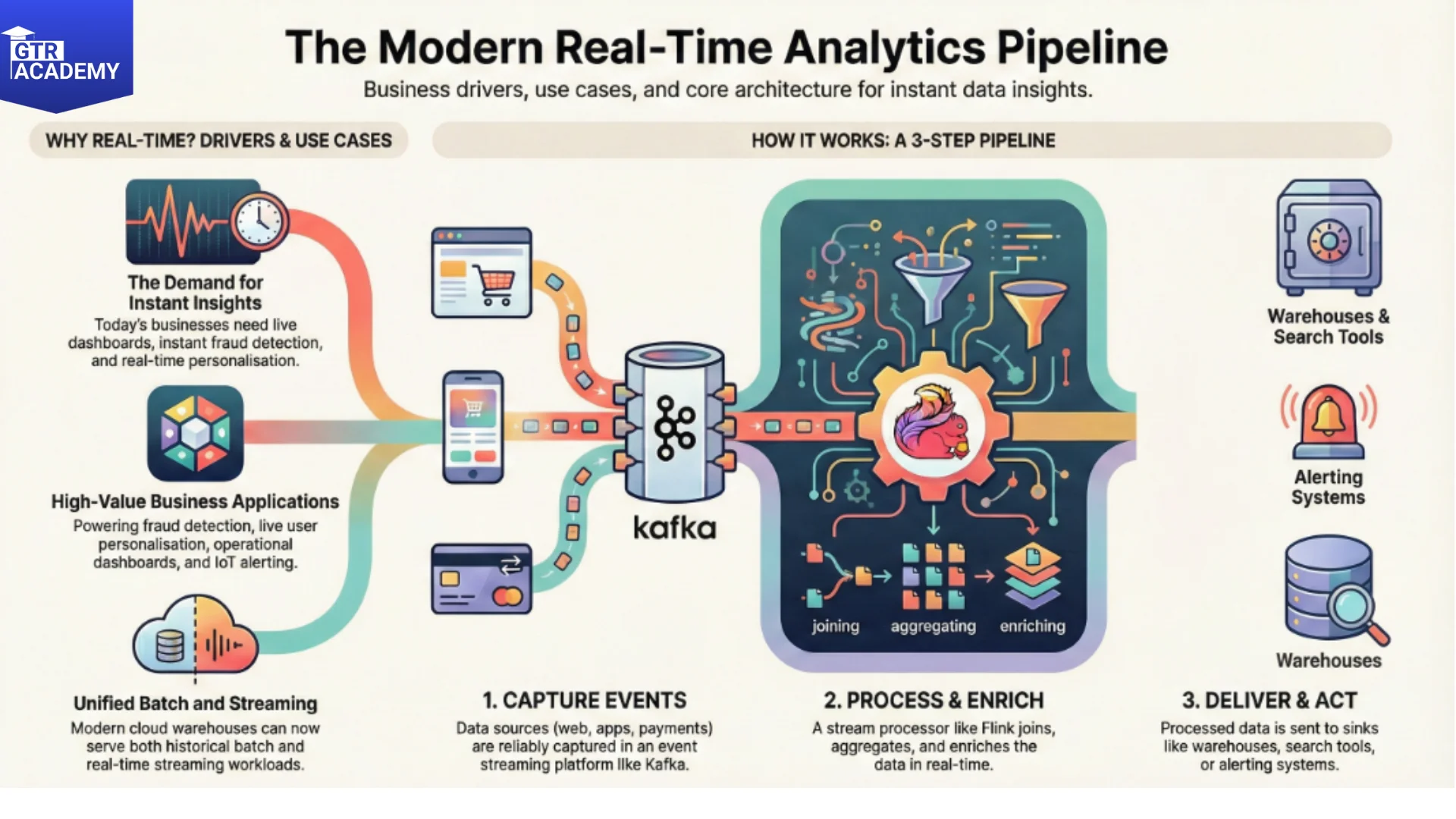
What changed to make real‑time feasible?
Key enablers:
- Event streaming platforms like Kafka, Kinesis, Pub/Sub reliably capture and route high‑volume events.
- Stream processors like Flink, Spark Streaming, ksqlDB join, aggregate, and enrich streams in real time.
- Cloud warehouses like Snowflake Streams, Big Query Streaming, Redshift Streaming ingest and query recent data instantly.
You no longer need a separate “real‑time stack”—the same warehouse serves both batch and streaming workloads.
Common real‑time use cases
Focus on business value:
- Fraud/risk – Join login events, device fingerprints, and transaction streams; score and block in <1s.
- Personalization – Real‑time user profiles updated with every click, powering next‑best recommendations.
- Live dashboards – Aggregating metrics over sliding windows (last 5min, 1hr, 24hr) for ops and execs.
- IoT/alerting – Sensor streams triggering maintenance alerts when anomalies appear.
These patterns power 80% of “AI‑first” customer experiences.
How a streaming pipeline works
Simple architecture:
- Sources → Kafka topics (web events, app telemetry, payments).
- Stream processing (Flink): windowed aggregations, joins with lookup tables (customer profiles), ML scoring.
- Sinks → warehouse (streaming inserts), Elasticsearch (search), Redis (caching), or action systems (email, Slack).
Example Flink SQL for 5min session counts:
- SQL:
- SELECT user id, COUNT (*) as session count
- FROM events
- WINDOW TUMBLE (PROCTIME (), INTERVAL ‘5’ MINUTES)
- GROUP BY user id
- Getting started without complexity
- Practical advice:
- Start small – Pick one high‑value metric (active users, conversion funnel) and stream it to a live dashboard.
- Use managed services – Confluent Cloud (Kafka), Up solver/ Flink as service, Snowflake/Kafka connector.
- Hybrid approach – Append‑only streaming to warehouse + materialized views for low‑latency queries.
- Monitor end‑to‑end – Event volume, processing latency, sink success rates.
Pure batch thinking won’t cut it anymore – real‑time is becoming table stakes for competitive analytics.
Try this – Set up a simple Kafka topic + streaming sink to your warehouse. Pipe 1K events/sec of dummy web analytics and query “users active in last 10min” in SQL.


